Yellowchalk: A Friendly Font for Business
As a small business owner, I’ve learned that even the smallest details can make a big difference. One of those details is typography. When I was redesigning my bakery’s packaging, I knew I needed a font that felt approachable and fun but still professional. That’s when I discovered Yellowchalk.
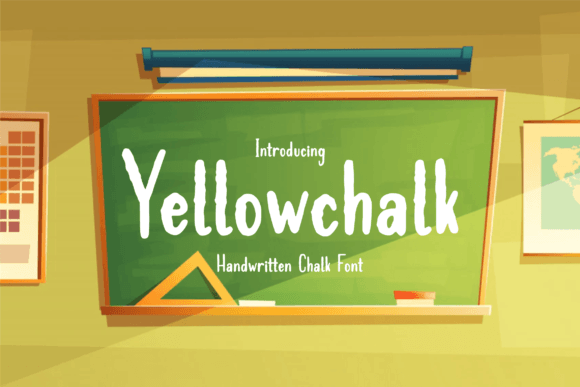
Yellowchalk is a script handwritten font with a childlike charm. It has the soft, uneven edges of real chalk on a blackboard, giving it a warm, tactile feel. This font isn’t just about style—it’s about personality. It feels like a friendly nod from your favorite teacher or a playful message from a local artisan.
Using Yellowchalk on my bakery boxes made a noticeable difference. The font added a sense of authenticity and creativity that matched the handmade nature of my products. It wasn’t too flashy, but it stood out in a way that felt natural and inviting. Customers who saw the packaging often commented on how it made them feel like they were getting something special.
When to Use Yellowchalk
Yellowchalk works best as a display font. It shines in headlines, logos, and short phrases where it can be the star of the design. For example, using it on a café menu title or a skincare label gives the brand a more personal touch without overwhelming the reader.
It’s not ideal for long paragraphs, but it can be used effectively in product descriptions, taglines, or social media captions. The key is to balance it with other fonts. Pairing Yellowchalk with a clean sans serif font like Helvetica or a classic serif font like Georgia helps keep the design from feeling too chaotic.
For a boutique, Yellowchalk could be perfect for price tags or event invitations. It adds a handcrafted feel that resonates with customers looking for unique, thoughtful products.
Designing with Yellowchalk
When working with Yellowchalk, I always start by considering the context. If it’s for a printed package, I make sure the font is large enough to read clearly. On small labels, I avoid using it for anything more than a brand name or a short phrase. Too much text in this font can become hard to read, especially at smaller sizes.
On digital platforms, like Instagram or online shop banners, Yellowchalk can add a dynamic, eye-catching element. It’s great for promotional text or headlines that need to stand out. But again, it’s important to test how it looks on different screen sizes. Mobile users might not see the subtle details as well as desktop users, so keeping the text size generous is key.
One of the things I appreciate most about Yellowchalk is its versatility. It comes in multiple styles, including regular, bold, and alternate versions. This allows for creative flexibility without needing to switch fonts. Whether I’m designing a thank-you card or updating a website banner, Yellowchalk offers a cohesive look that feels intentional.
How Typography Shapes Brand Perception
Typography plays a huge role in how a brand is perceived. A well-chosen font can make a business feel more trustworthy, organized, and professional. Yellowchalk, with its friendly and expressive character, is perfect for brands that want to communicate warmth and creativity.
It’s also useful for businesses that want to build a consistent visual identity. Using the same font across different materials—like packaging, social media, and marketing collateral—helps reinforce brand recognition. Customers start to associate that font with the quality and personality of the business.
For a beauty brand, for instance, Yellowchalk could be used on product labels to highlight key ingredients or benefits. It adds a personal, artisanal touch that complements the product’s story. Similarly, for an online shop, using it in banners or promotional graphics can create a more engaging and memorable experience for visitors.
Pairing Yellowchalk with Other Fonts
Font pairing is an art form in itself. When using Yellowchalk, it’s helpful to pair it with a font that balances its whimsical nature. A modern sans serif like Montserrat or a classic serif like Times New Roman can provide contrast while keeping the overall design harmonious.
For a more elegant look, pairing Yellowchalk with a script font like Great Vibes or a handwritten font like Pacifico can create a layered effect. However, it’s important to avoid overcomplicating the design. Too many fonts can confuse the message and dilute the brand’s identity.
When working on a project, I always check the font’s file formats and licensing. Yellowchalk is available in common formats like OTF and TTF, which makes it easy to use across different platforms. It also includes multilingual support, which is essential for businesses targeting diverse audiences.
Whether you’re a baker, a candle seller, or a boutique owner, Yellowchalk offers a way to elevate your branding without sacrificing personality. It’s a premium font that brings a sense of creativity and warmth to every design it touches.